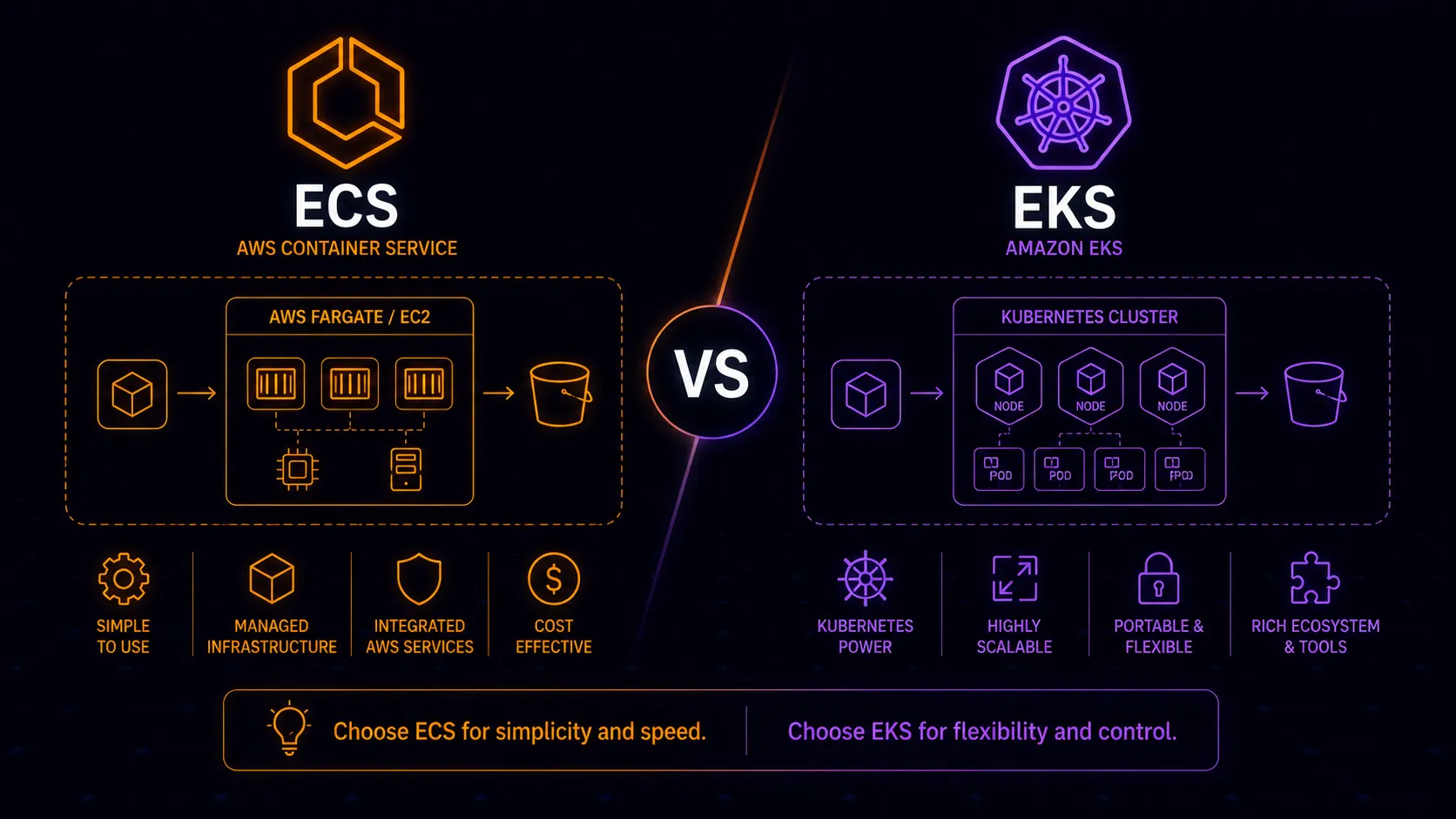
Both ECS and EKS run containers on AWS. Both support Fargate and EC2 launch types. Both integrate with IAM, VPCs, and load balancers. But they represent fundamentally different philosophies about how container orchestration should work, and picking the wrong one costs you either in operational complexity or in capability you’ll eventually need. For managed Kubernetes across cloud providers, see EKS vs GKE vs AKS.
ECS is AWS’s proprietary orchestrator. EKS is managed Kubernetes. The choice between them shapes how your team works, what tools you use, and how locked in you are to AWS. We’ve helped teams navigate this decision dozens of times, and the answer is rarely obvious from a feature comparison alone. It depends on your team, your workloads, and what you’re willing to operate.
What You’re Actually Choosing Between
ECS organizes containers around three concepts: tasks (one or more containers running together), services (maintaining a desired count of tasks behind a load balancer), and clusters (logical groupings of tasks and services). You write a task definition in JSON, create a service, and ECS handles scheduling and health management. The mental model is small and focused.
EKS gives you the full Kubernetes API. Pods, deployments, services, ingresses, config maps, secrets, namespaces, persistent volume claims, custom resource definitions, operators, admission controllers. The mental model is large and powerful. You interact with EKS the same way you’d interact with any Kubernetes cluster: kubectl, Helm, and the massive ecosystem built around the Kubernetes API.
The surface area difference is real. ECS has maybe a dozen core concepts. Kubernetes has dozens, and they interact in ways that take months to fully understand. That complexity isn’t waste–it enables capabilities ECS doesn’t have–but it’s the central trade-off in this decision.
ECS Strengths: Simplicity and AWS Integration
ECS was built by AWS, for AWS. That shows in the integrations.
IAM roles per task are native. You assign an IAM role directly to a task definition, and every container in that task assumes that role. No workarounds, no webhook-based token injection, no IRSA configuration. It works the way IAM works everywhere else in AWS.
Fargate integration is seamless. ECS on Fargate is arguably the simplest way to run containers in production on any cloud. Define a task, set CPU and memory, create a service, attach a load balancer. No nodes to manage, no capacity planning, no AMI updates. The operational overhead approaches zero for straightforward workloads.
CloudWatch, ALB, and service discovery work out of the box. ECS tasks register directly as ALB target groups. Logs route to CloudWatch without sidecar containers. Service discovery through Cloud Map integrates natively. These aren’t afterthoughts bolted on via annotations and controllers; they’re first-class features.
Deployment is straightforward. Rolling deployments and blue-green deployments via CodeDeploy work reliably. No Helm release management, no manifest templating, no GitOps controller to maintain. Update the task definition, update the service, ECS handles the rest.
The learning curve is weeks, not months. A competent AWS engineer can be productive with ECS in days. The documentation is manageable. The concepts map directly to familiar AWS primitives. There’s less to get wrong because there’s less surface area.
ECS Exec for debugging. Need to SSH into a running container? ECS Exec provides interactive shell access to running tasks, similar to kubectl exec but integrated with IAM and CloudTrail for audit logging. It’s a small feature, but it reflects the broader pattern: ECS provides practical capabilities with AWS-native access controls baked in.
EKS Strengths: Ecosystem and Portability
EKS gives you Kubernetes, and Kubernetes gives you an ecosystem that ECS can’t match.
Helm charts and operators. Need to deploy PostgreSQL, Redis, Kafka, or Elasticsearch? There’s a Helm chart for it. Need a database that manages its own failover, backup, and scaling? There’s an operator for it. The Kubernetes ecosystem has pre-built solutions for problems that ECS teams solve with custom automation or separate AWS services. Operators in particular are a category of capability that simply doesn’t exist in ECS–self-managing, self-healing application components that extend the Kubernetes API itself.
Networking flexibility. Kubernetes networking supports CNI plugins like Calico and Cilium that provide network policies, eBPF-based observability, and fine-grained traffic control. Service meshes like Istio and Linkerd give you mTLS, traffic splitting, circuit breaking, and detailed observability between services. ECS’s networking is simpler, which is an advantage until you need capabilities it doesn’t offer.
Portability is real. A Kubernetes deployment manifest works on EKS, GKE, AKS, and on-premises clusters with minimal changes. If multi-cloud is part of your strategy, or if you want to avoid deep AWS lock-in, EKS keeps that door open. ECS workloads are AWS-only. Moving them requires rewriting orchestration from scratch. That said, portability has limits–AWS-specific integrations like ALB ingress controllers, EBS storage classes, and IAM roles for service accounts won’t transfer directly. The application layer is portable; the infrastructure glue still needs adaptation.
Scheduling and resource management. Kubernetes offers pod affinity and anti-affinity, taints and tolerations, priority classes, pod disruption budgets, topology spread constraints, and resource quotas per namespace. These controls let you run mixed workloads on shared infrastructure with fine-grained placement logic. ECS has placement constraints and strategies, but they’re simpler and less expressive.
Custom Resource Definitions (CRDs). Kubernetes lets you extend its API with your own resource types. Teams build internal platforms on top of Kubernetes by defining custom resources that abstract away complexity for developers. This extensibility turns Kubernetes from an orchestrator into a platform-building toolkit. ECS is an orchestrator, period.
Operational Complexity: The Defining Trade-off
This is where the decision gets real. ECS is significantly simpler to operate, and that simplicity has measurable value.
ECS operations amount to: maintain task definitions, configure services and auto-scaling, set up load balancers, manage IAM roles and security groups, monitor with CloudWatch. A single platform engineer can support a substantial ECS deployment. Most of the underlying infrastructure is managed by AWS, especially on Fargate.
EKS operations include everything above plus: Kubernetes version upgrades (which AWS supports for roughly 14 months per version, creating a forced upgrade cycle), node group management and AMI patching, VPC CNI configuration and IP address planning, RBAC policies for multi-team access, network policies, ingress controller management, Helm chart maintenance, potentially a service mesh, monitoring the Kubernetes control plane itself, and troubleshooting the interactions between all of these components. This workload typically requires a dedicated platform team–or at minimum, an engineer who treats Kubernetes operations as a primary responsibility rather than a side task.
The upgrade cycle deserves emphasis. EKS clusters must be upgraded regularly as Kubernetes versions reach end of support. Each upgrade requires testing compatibility with your workloads, add-ons, and tooling. Skip too many versions and you face a painful multi-step upgrade path. ECS has no equivalent burden–AWS manages the underlying orchestration platform transparently.
Teams consistently underestimate EKS operational costs. The engineering time spent on Kubernetes operations is a real expense that belongs in your comparison, not just the AWS bill.
A concrete example: one team we worked with ran six microservices on EKS. Their platform engineer spent roughly 30% of their time on cluster operations–upgrades, debugging CNI issues, maintaining Helm charts, managing RBAC. When they evaluated the same workload on ECS with Fargate, the ongoing maintenance dropped to a few hours per month. The Kubernetes ecosystem tooling they were using (ArgoCD, external-dns, cert-manager) provided real value, but the team had to honestly assess whether that value justified the operational investment for their scale.
Cost: Control Plane and Beyond
ECS control plane is free. You pay only for the compute resources your tasks consume, whether on EC2 or Fargate. There’s no per-cluster fee.
EKS charges approximately $75 per month per cluster for the managed control plane. For a single production cluster, this is a rounding error. For organizations running multiple clusters across environments–dev, staging, production, perhaps per-team clusters–it adds up. Four clusters cost $300/month before a single container runs.
But the control plane fee is the smaller cost difference. The larger gap is operational. An EKS cluster that requires two engineers spending 20% of their time on Kubernetes operations costs thousands per month in engineering time. An ECS deployment that one engineer manages as part of a broader role costs a fraction of that.
Compute costs are roughly equivalent. Both services run on the same underlying EC2 instances or Fargate tasks. The difference is in what you pay to manage the orchestration layer.
One area where EKS can actually save money: bin-packing. Kubernetes’ scheduler is more sophisticated at placing workloads onto nodes, and features like the Cluster Autoscaler and Karpenter can optimize node utilization more aggressively than ECS’s capacity providers. At scale–dozens of services with varying resource profiles–this can reduce compute waste meaningfully. For a full breakdown of Kubernetes cost levers, see Kubernetes cost optimization. For smaller deployments, the difference is negligible compared to the operational cost gap.
Networking: Simple vs. Flexible
ECS networking in awsvpc mode gives each task its own elastic network interface and private IP address within your VPC. Tasks communicate using VPC networking and security groups. It’s straightforward, predictable, and works the way every other AWS resource works. The limitation: security groups operate at the task level, and there’s no built-in concept of network policies or fine-grained inter-service traffic control beyond what security groups provide.
Kubernetes networking operates on a flat network model where every pod can reach every other pod by default. You layer controls on top: network policies (supported by Calico, Cilium, or the AWS VPC CNI’s built-in policy support) to restrict traffic, service meshes to add encryption and observability, and ingress controllers to manage external access. More powerful, but more configuration to get right. Misconfigured network policies are a common source of outages in Kubernetes environments.
If your networking needs are “services talk to each other over private IPs with security groups controlling access,” ECS handles this natively. If you need per-service traffic policies, mutual TLS between services, or canary traffic splitting at the network layer, you need what Kubernetes offers.
One practical consideration: ECS in awsvpc mode consumes one ENI per task, and EC2 instances have ENI limits. On smaller instance types, this can limit how many tasks run per instance. Fargate sidesteps this issue entirely. On the Kubernetes side, the AWS VPC CNI assigns pod IPs from your VPC subnet, which can lead to IP address exhaustion in large clusters if subnets aren’t sized appropriately. Both have networking gotchas; they’re just different gotchas.
Ecosystem and Extensibility
This is EKS’s most significant advantage, and it compounds over time.
The Kubernetes ecosystem includes mature solutions for GitOps (ArgoCD, Flux), secret management (External Secrets Operator, Sealed Secrets), certificate management (cert-manager), autoscaling (KEDA for event-driven scaling), progressive delivery (Argo Rollouts, Flagger), policy enforcement (OPA Gatekeeper, Kyverno), and dozens of other operational concerns.
ECS relies on AWS services for most of these capabilities. Some map well: AWS Secrets Manager handles secrets, ACM handles certificates, CodeDeploy handles deployments. Others have no direct equivalent: there’s no ECS-native equivalent to KEDA’s event-driven scaling or Argo Rollouts’ canary analysis.
For teams building complex platforms with many moving parts, the Kubernetes ecosystem provides building blocks that accelerate development. For teams with simpler needs, the AWS-native alternatives are sufficient and simpler to manage.
It’s worth noting that this ecosystem advantage has a flip side: dependency management. Each tool in your Kubernetes stack has its own release cycle, breaking changes, and compatibility matrix. Upgrading Kubernetes might break your ingress controller, which might break your cert-manager integration. The more ecosystem tools you adopt, the more upgrade coordination you take on. ECS’s smaller surface area means fewer moving parts to keep in sync.
Team Skills: The Practical Tiebreaker
If your team is built around AWS expertise–they think in IAM policies, CloudFormation, and AWS service integrations–ECS is the natural fit. The orchestrator works like everything else they know. Adding Kubernetes expertise is a significant investment that takes months of dedicated learning and practice before the team is operating EKS confidently in production.
If your team already knows Kubernetes–they’ve run it elsewhere, they’re comfortable with kubectl and Helm, they understand the networking model–EKS is the obvious choice. Forcing a Kubernetes-native team onto ECS means abandoning tooling and patterns they already know for a less capable alternative.
For teams without strong opinions or existing expertise in either, ECS is the lower-risk starting point. You can always move to EKS later if you outgrow ECS. Moving from EKS back to ECS is rare and painful–it means abandoning Kubernetes-specific tooling and patterns you’ve built around.
There’s also a hiring dimension. Kubernetes skills are more common in the market than ECS-specific skills, because Kubernetes is cloud-agnostic and widely taught. If you’re scaling a platform team and plan to hire externally, EKS means a larger talent pool. On the other hand, engineers who know AWS deeply can become productive with ECS faster than engineers who know Kubernetes can become productive with the AWS-specific aspects of EKS (VPC CNI quirks, IRSA, managed node groups).
When to Choose ECS
ECS is the better fit when:
- Your team is AWS-focused and doesn’t have Kubernetes expertise
- Your workloads are services, workers, and scheduled tasks without exotic orchestration needs
- You want to minimize operational overhead and don’t have a dedicated platform team
- Fargate’s serverless container model fits your operational preferences
- You don’t need the Kubernetes ecosystem’s advanced tooling
- Portability to other clouds isn’t a near-term concern
- You want to move fast with fewer moving parts
A typical ECS-appropriate setup: a handful of web services behind an ALB, some background workers processing SQS queues, scheduled tasks for batch jobs. This covers a surprising number of production architectures, and ECS handles all of it without requiring specialized orchestration knowledge.
When to Choose EKS
EKS is the better fit when:
- Your team has Kubernetes experience and wants to use it
- You need the Kubernetes ecosystem: operators, service meshes, CRDs, GitOps tooling
- Multi-cloud or hybrid-cloud is part of your strategy
- You’re building an internal platform and need Kubernetes’ extensibility
- Complex scheduling requirements (affinity, topology spread, resource quotas) matter
- You have the team capacity to operate Kubernetes properly
- You’re running enough workloads to justify the operational investment
A typical EKS-appropriate setup: a platform team supporting multiple development teams, each needing namespace-level isolation, custom deployment workflows, service mesh for inter-service communication, and operators managing stateful infrastructure. The Kubernetes abstraction layer pays for itself when the platform serves many teams with diverse needs.
Portability: How Much Does It Matter?
Portability is frequently cited as EKS’s killer advantage, but it deserves honest examination. Most organizations that choose EKS for portability never actually move workloads to another cloud. The portability becomes insurance rather than a used capability.
That insurance has value–it gives you negotiating leverage with AWS, it de-risks your architecture against future strategic shifts, and it makes acquisitions or mergers smoother if the other organization runs a different cloud. But if your organization is committed to AWS with no realistic multi-cloud plans, portability is a benefit you’re paying for in operational complexity without collecting on.
On the other hand, if you’re genuinely pursuing multi-cloud (perhaps for regulatory reasons, disaster recovery, or to avoid single-vendor dependency), EKS is the clear choice. Kubernetes provides a real abstraction layer. ECS provides none. Running the same workloads on GKE or AKS with shared Helm charts and CI/CD pipelines is practical in ways that are impossible with ECS.
The Bottom Line
ECS is the right default for most AWS teams. It’s simpler to learn, simpler to operate, and integrates deeply with the AWS services you’re already using. The control plane is free. Fargate makes it nearly serverless. For straightforward container workloads, ECS does the job with less friction and lower total cost of ownership.
EKS is the right choice when you genuinely need what Kubernetes provides: ecosystem tooling, portability, extensibility, or advanced orchestration capabilities. These are real advantages, not theoretical ones–but they come with real operational costs that persist for as long as you run the cluster.
The mistake teams make most often is choosing EKS because Kubernetes is the industry standard, then spending months building platform expertise they wouldn’t have needed with ECS. Choose based on what you actually need today, not what the industry says you should want. If your requirements change later, migration from ECS to EKS is a well-trodden path–your containers work on both, and the orchestration layer is what changes.
Start with the simplest tool that meets your requirements. Evolve when you hit real limitations, not hypothetical ones.