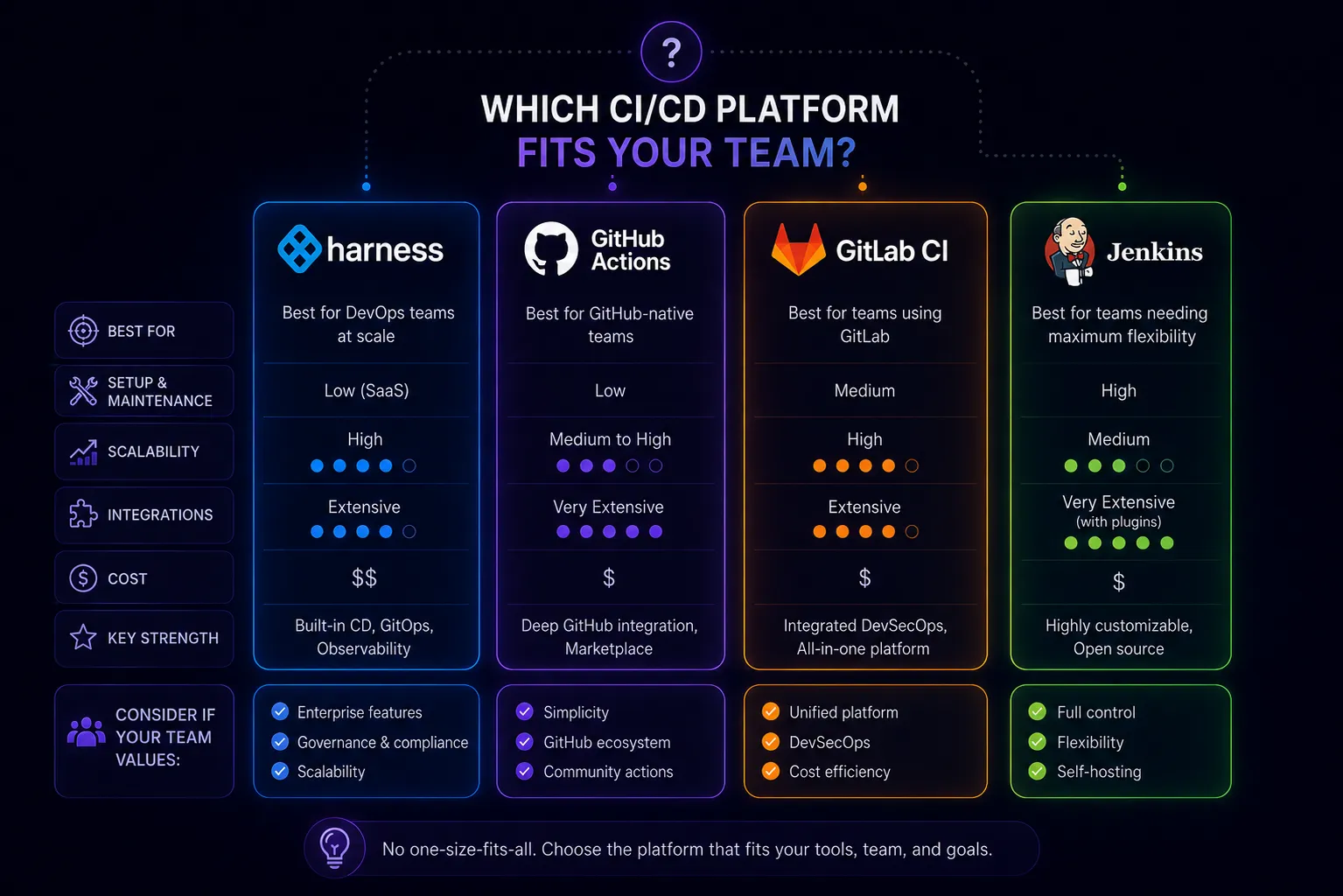
Most CI/CD platform comparisons treat these four tools as direct competitors. They aren’t. Jenkins, GitHub Actions, and GitLab CI are CI-first platforms that added CD capabilities. Harness is a CD-first platform that added CI. Understanding that distinction saves you from evaluating them on the wrong criteria.
What Each Tool Actually Is
Jenkins is a self-hosted automation server. It’s been around since 2011 (as Hudson), runs on your infrastructure, and can automate virtually anything through its plugin ecosystem (1,800+ plugins). It has no opinions about how you structure your pipelines, which is both its strength and its problem.
GitHub Actions is CI/CD built into GitHub. Workflows live in your repository, trigger on GitHub events (push, PR, issue, release, schedule), and run on GitHub-hosted runners or your own. It’s deeply integrated with the GitHub ecosystem—marketplace actions, OIDC federation, environment protection rules, and Dependabot.
GitLab CI is CI/CD built into GitLab. Like GitHub Actions but with tighter integration to GitLab’s broader DevSecOps platform: container registry, package registry, security scanning, DAST, dependency proxying, and environment management all ship together. Available on GitLab.com or self-hosted.
Harness is an enterprise CD platform. Its CI module (acquired from Drone.io) runs builds, but Harness’s core value proposition is deployment pipelines: canary deployments, blue-green deployments, rollback automation, SLO-based deployment gates, and cost governance across Kubernetes, ECS, serverless, and traditional VMs. It’s built for platform engineering teams managing deployments at scale.
Pipeline Model Comparison
Jenkins pipelines are defined in Groovy (Declarative or Scripted). Declarative is more structured and readable; Scripted gives you full Groovy scripting. Both require managing a master and agent infrastructure. Shared Libraries let you abstract common logic, but they’re a Groovy module system that most teams find difficult to maintain.
pipeline {
    agent any
    stages {
        stage('Build') {
            steps {
                sh 'make build'
            }
        }
    }
}
GitHub Actions uses YAML with a composable action model. Each step either runs a shell command or calls a reusable action from the marketplace or your own repo. Matrix builds, concurrency controls, and environment approvals are built in.
jobs:
  build:
    runs-on: ubuntu-latest
    steps:
      - uses: actions/checkout@v4
      - run: make build
GitLab CI uses YAML with an include system for reusable templates. The .gitlab-ci.yml model is similar to GitHub Actions but predates it—some conventions differ (stages are explicit, not implicit). GitLab’s CI/CD component catalog is the equivalent of the GitHub marketplace.
Harness pipelines are defined in YAML or through a visual pipeline studio. The CD pipelines are significantly more complex than the others—they model services, environments, infrastructure definitions, and deployment strategies separately. This power comes with a steeper learning curve.
Cost Reality
Jenkins is open source and free. The real cost is operational: someone has to maintain the master, manage agents, keep plugins updated, and debug the inevitable plugin version conflicts. At scale, this is a 0.5–2 FTE depending on usage. Small teams underestimate this; large teams often have a dedicated “Jenkins team.”
GitHub Actions bills by compute minute. Public repos are free. Private repos get 2,000 minutes/month free on Free plan, 3,000 on Pro/Team, then pay-as-you-go at $0.008/minute for Linux. A team running 100 PRs/day with 10-minute builds hits ~1,000 minutes/day—about $6/day, or $180/month before discounts. Self-hosted runners eliminate per-minute billing but add infrastructure management.
GitLab CI on GitLab.com includes 400 minutes/month on the free tier, 10,000 on Premium ($29/user/month), unlimited on Ultimate ($99/user/month). Self-hosted GitLab (Community or Enterprise) has no minute limits—you manage the runners. GitLab’s all-in-one pricing often beats GitHub when you factor in security scanning, container registry, and package registry.
Harness pricing is opaque and enterprise-negotiated. Community Edition is free with significant limits. The CD module typically costs $2–5/service/month at scale. For large organizations managing hundreds of services, Harness can run $50k+/year—but so does the operational overhead of running Jenkins at that scale.
Where Each Platform Falls Short
Jenkins weaknesses:
- Plugin dependency hell: upgrading one plugin breaks three others
- No native secrets management (relies on plugins or external vaults)
- UI from 2011—functional but painful
- Groovy is a barrier for teams that don’t know it
- No native OIDC federation with cloud providers (requires plugins)
GitHub Actions weaknesses:
- Tied to GitHub—migrating away is painful
- Marketplace action quality varies wildly; supply chain risk is real
- No native deployment strategies (canary, blue-green require custom scripting—see zero-downtime deployment strategies)
- Per-minute billing penalizes slow builds
- Limited environment management compared to GitLab or Harness
GitLab CI weaknesses:
- Steeper initial learning curve than GitHub Actions
- Self-hosting GitLab requires more infrastructure than self-hosting runners
- GitLab.com runner performance is inconsistent compared to GitHub’s
- The all-in-one approach means you’re buying a lot of features you may not use
Harness weaknesses:
- CI module (Drone heritage) lags behind GitHub Actions and GitLab CI in ecosystem depth
- Significant platform complexity—plan for 2–4 weeks of onboarding per team
- Enterprise pricing makes it inaccessible for small teams
- Debugging failures requires understanding Harness’s abstraction layers, not just your pipeline
The Decision Framework
Choose Jenkins if:
- You have complex, custom automation that doesn’t fit standard CI/CD patterns
- You’re already running Jenkins and the operational cost is acceptable
- Your pipelines have deeply custom Groovy logic that would be difficult to port
- You need to run on-premise with no SaaS dependency
Choose GitHub Actions if:
- Your source code is already on GitHub (or you’d be comfortable moving it there)
- You want minimal setup and a large ecosystem of reusable actions
- Your build times are reasonable (under 15–20 minutes), keeping costs manageable
- You don’t need sophisticated deployment pipeline orchestration
Choose GitLab CI if:
- You want an integrated DevSecOps platform (CI/CD + security scanning + registry + project management)
- You’re comfortable self-hosting or willing to pay for GitLab.com Premium
- You want to migrate away from GitHub without losing CI/CD sophistication
- Compliance requirements favor a single-vendor, self-hostable solution
Choose Harness if:
- Your primary pain is in deployments, not builds—rollbacks, canary releases, SLO gates
- You manage 50+ services across multiple environments and cloud accounts
- You have a platform engineering team with budget to invest in the tooling
- You’ve outgrown the deployment capabilities of GitHub Actions or GitLab CI
What Most Teams Actually Do
Startups default to GitHub Actions. It’s zero-friction if you’re on GitHub, the free tier covers early-stage builds, and the marketplace handles most integrations.
Mid-size engineering orgs often run GitHub Actions or GitLab CI for CI, with a separate CD layer—Argo CD or Flux—for production deployments. This pattern separates build concerns from deploy concerns without paying for Harness.
Large enterprises are the Harness customer. The deployment governance, cost management, and multi-cloud support justify the cost when you’re managing hundreds of services and deployment failures cost real money.
Jenkins hangs around in organizations that adopted it early and haven’t had a forcing function to migrate. The migration cost is real, but so is the ongoing Jenkins tax. If you’re evaluating whether Jenkins is still the right tool, see Jenkins Still Relevant? and the CI/CD migration guide for what the transition actually looks like.