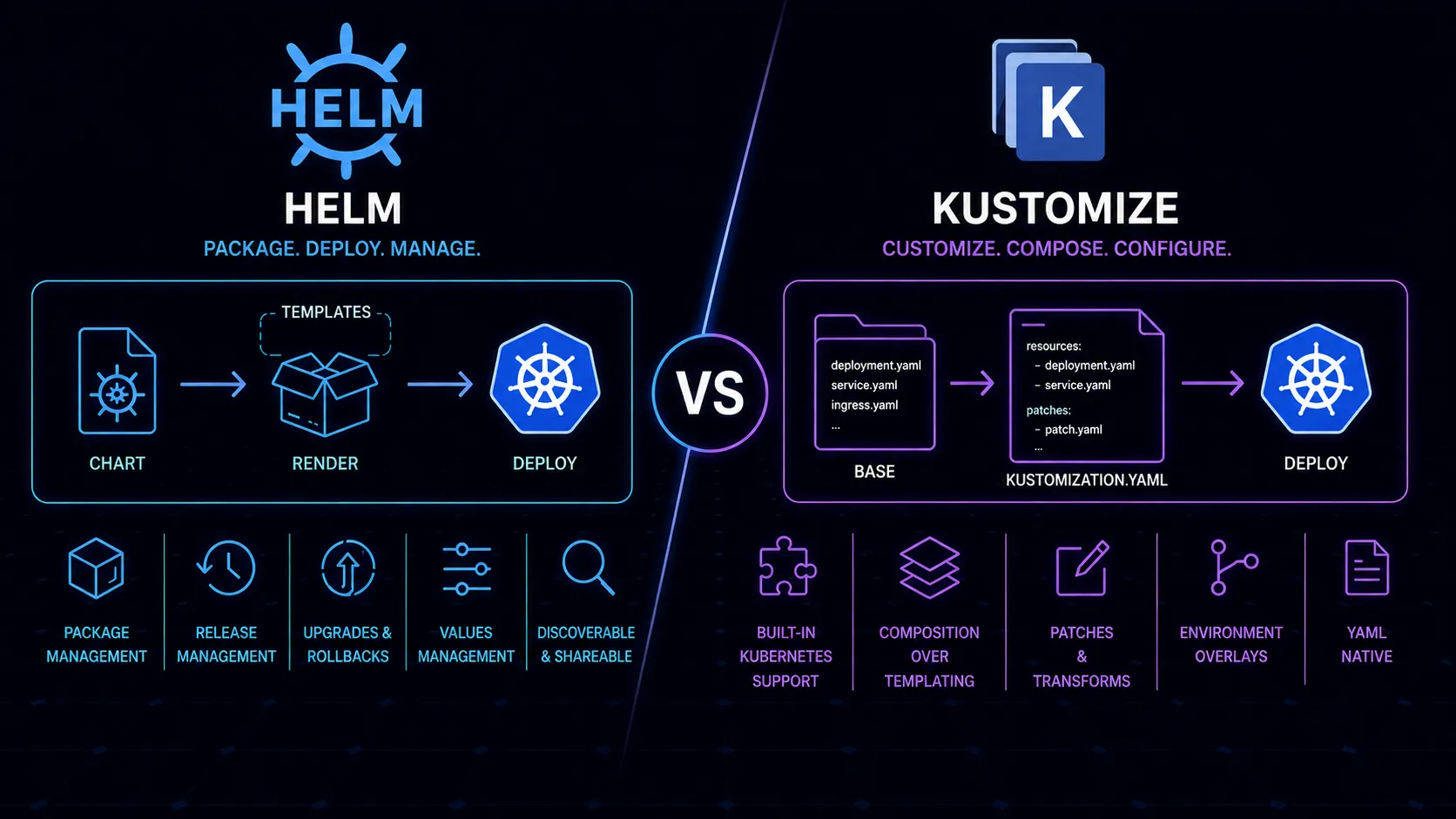
Managing Kubernetes manifests by hand stops working around the third environment. Copy-pasting YAML between dev, staging, and production leads to drift, and nobody wants to debug a missing annotation at 2 AM because someone forgot to update the prod version of a deployment. Helm and Kustomize both solve this problem, but they approach it from opposite directions.
Two Philosophies
Helm is a package manager for Kubernetes. You write templates using Go’s text/template syntax, inject values from a values.yaml file, and produce rendered manifests. Charts bundle templates, default values, and metadata into a distributable package. Think of it like apt or brew, but for Kubernetes resources.
Kustomize is a template-free overlay system. You start with base YAML manifests—valid Kubernetes resources—and layer modifications on top using patches, strategic merge patches, and transformers. There’s no templating language. The output is still valid YAML at every stage. Since Kubernetes 1.14, Kustomize ships built into kubectl via kubectl apply -k.
The distinction matters more than it sounds. Helm generates YAML from templates. Kustomize transforms existing YAML. One starts with abstraction; the other starts with concrete manifests.
Helm’s Strengths
Charts as Distributable Packages
Helm’s killer feature is packaging. A chart is a self-contained unit—templates, default values, documentation, dependencies—that you can version, publish to a repository, and share. The Bitnami library alone has hundreds of production-ready charts for databases, message queues, monitoring stacks, and more. Need to deploy PostgreSQL? helm install my-db bitnami/postgresql gets you a working deployment with sensible defaults in seconds.
This packaging model is genuinely powerful for software distribution. If you’re building something that other teams or organizations will deploy on their own clusters, Helm charts are the standard mechanism. OCI registries now support chart storage alongside container images, tightening the distribution story further.
Parameterization Through Values
Helm’s values.yaml provides a structured way to expose configuration knobs. Users don’t need to understand the templates—they just set values. Replica count, resource limits, image tags, feature toggles, ingress configuration—all controlled through a single file or command-line overrides. For third-party charts, this abstraction is exactly right. You shouldn’t need to understand the internal structure of a PostgreSQL chart to deploy one.
Lifecycle Management
Helm hooks let you run jobs at specific points in a release lifecycle: pre-install, post-upgrade, pre-delete. Database migrations on upgrade, cleanup jobs on deletion, validation before install. This lifecycle awareness is built into the tool, not bolted on. For applications where deployments involve more than just applying manifests—where you need to run schema migrations before the new code starts, or seed data after a fresh install—hooks provide a structured way to handle sequencing without external scripting.
Release Tracking
Helm tracks releases as first-class objects. You can list what’s installed, see revision history, roll back to a previous version, and diff between revisions. helm rollback my-app 3 takes you back to revision 3. This operational capability is baked in rather than something you build yourself.
Helm stores release history as Secrets in the cluster by default. This means you can inspect what’s deployed, what values were used, and what changed between revisions—all from kubectl or the Helm CLI. When something breaks after a deployment, having that history immediately accessible matters.
Kustomize’s Strengths
No Templating Language
Every file in a Kustomize project is valid YAML. There are no {{ .Values.replicaCount }} expressions, no {{- if .Values.ingress.enabled }} conditionals, no {{- range .Values.extraVolumes }} loops scattered through your manifests. You can validate any file with kubectl apply --dry-run at any stage. You can read any file without mentally parsing template logic.
This is a significant readability advantage. Helm templates in complex charts become genuinely difficult to follow. Nested conditionals, helper templates calling other helper templates, whitespace control characters everywhere—the Go template syntax was designed for rendering text, not for expressing Kubernetes configuration logic. It shows.
Built Into kubectl
kubectl apply -k ./overlays/production works without installing anything extra. No Helm binary, no Tiller (mercifully retired), no chart repository configuration. For teams that want to minimize their toolchain, this matters. Every cluster that has kubectl already has Kustomize.
One caveat: the version of Kustomize bundled with kubectl sometimes lags behind the standalone binary. Features like helmCharts or newer transformer options may require installing Kustomize separately. For basic overlay and patching workflows, the built-in version is sufficient.
Overlay-Based Customization
Kustomize structures configuration as bases and overlays. A base directory contains your core manifests. Overlay directories layer environment-specific changes on top—different replica counts for dev versus production, different resource limits, different ConfigMap values. The structure maps directly to how most teams think about environment differences.
app/
  base/
    deployment.yaml
    service.yaml
    kustomization.yaml
  overlays/
    dev/
      kustomization.yaml
      replica-patch.yaml
    production/
      kustomization.yaml
      replica-patch.yaml
      hpa.yaml
Each overlay’s kustomization.yaml references the base and declares patches. The relationship is explicit and traceable.
Strategic Merge Patches
Kustomize’s patching model lets you modify specific fields without rewriting entire resources. Need to change the replica count and add a sidecar container in production? Write a patch that targets just those fields. The rest of the base manifest passes through unchanged. This surgical approach means patches are small, focused, and easy to review in pull requests.
The Template Complexity Problem
Helm templates degrade as complexity increases. A simple chart with a deployment, service, and ingress is fine. But charts that try to handle every possible configuration—optional sidecars, multiple container types, conditional CRDs, configurable security contexts, arbitrary extra volumes and environment variables—become walls of template logic that are harder to read than the Kubernetes API documentation they’re abstracting.
Look at any large community chart and search for _helpers.tpl. You’ll find template functions defining naming conventions, label selectors, and common blocks, called from other templates that themselves contain conditional logic. Debugging a rendering issue means mentally executing Go templates, which is exactly as unpleasant as it sounds.
Kustomize patches don’t have this problem because they don’t have a programming model. A patch is a fragment of valid YAML that gets merged into the base. It’s limited—you can’t express the same level of parameterization that Helm templates allow—but what you can express remains readable.
Packaging and Distribution
This is Helm’s clearest advantage and Kustomize’s most notable gap. Helm charts are packages. You version them, publish them, pull them, and install them. Organizations build internal chart repositories for shared infrastructure patterns. The broader ecosystem publishes charts that save teams weeks of manifest authoring.
Kustomize bases are directories. You can reference remote bases via URLs in your kustomization.yaml, and this works for pulling from git repositories. But there’s no versioning mechanism beyond git tags or commit hashes, no dependency resolution, no repository browsing. Distributing a Kustomize base means pointing people at a git repository and hoping the directory structure stays stable.
If distribution is part of your requirements—you’re building platform tooling, publishing software for others to run, or standardizing deployment patterns across many teams—Helm’s packaging model is substantially better. This single factor is often the deciding one for platform engineering teams.
GitOps Compatibility
Both tools work with ArgoCD and Flux, the two dominant GitOps controllers. ArgoCD natively understands both Helm charts and Kustomize directories. Flux has dedicated controllers for each: HelmRelease for Helm, Kustomization for Kustomize.
The trade-offs are subtle. Helm with GitOps means your GitOps controller renders templates at sync time, which can make it harder to see exactly what will be applied without running helm template yourself. Kustomize with GitOps keeps everything in plain YAML that the GitOps controller patches together—the rendered output is more predictable and easier to audit.
Some teams prefer storing rendered Helm output in git (using helm template in CI) and deploying with Kustomize or plain kubectl. This gives you Helm’s packaging for sourcing charts while keeping the deployed manifests readable and auditable. It’s more pipeline work, but the transparency can be worth it.
There’s a practical difference in how drift detection works too. GitOps controllers comparing Kustomize output to cluster state are comparing plain YAML to plain YAML. With Helm, the controller needs to render templates first, which introduces another layer where things can diverge—different Helm versions, different function behavior, different library chart versions can all produce subtly different output.
Learning Curve
Kustomize is easier to start with. If you can write Kubernetes YAML, you can use Kustomize—the additional concepts are kustomization.yaml files, patches, and a handful of transformers. The mental model is straightforward: base manifests plus modifications equals output. Most developers can be productive with Kustomize within a day.
Helm requires learning Go template syntax, understanding the chart directory structure, knowing how values cascade, and grasping concepts like subcharts and dependencies. For someone who just wants to customize a deployment across environments, this is more machinery than necessary. But for someone who needs to parameterize complex software for diverse consumers, this machinery exists for a reason.
There’s also a debugging dimension. When a Kustomize build fails, the error usually points to a specific patch or resource conflict—something concrete you can find in a YAML file. When a Helm template renders incorrectly, you’re often staring at helm template --debug output trying to figure out which conditional branch produced unexpected whitespace or which value didn’t cascade the way you expected. Helm’s debugging experience improves with experience, but the initial frustration is real.
When to Choose Helm
Helm is the right tool when you’re deploying third-party software. Installing Prometheus, Grafana, cert-manager, ingress controllers, or databases—use the community charts. Maintaining your own manifests for widely-used software is wasted effort when battle-tested charts exist. These charts encode operational knowledge—proper health checks, security contexts, anti-affinity rules—that would take you time to figure out independently.
Helm is also the right tool when you need heavy parameterization for diverse consumers. If you’re building a platform and different teams need significantly different configurations of the same application—not just different values, but structurally different deployments—Helm’s template logic handles this where Kustomize’s patches become unwieldy.
And Helm is right when you need packaging and distribution. Internal chart repositories, versioned releases, dependency management—these capabilities matter for platform teams serving multiple product teams.
When to Choose Kustomize
Kustomize fits best for in-house applications where you control both the application and its deployment. You know the manifests. You know the environments. You don’t need to abstract away internals for unknown consumers. You need environment-specific overrides, and overlays handle this cleanly.
Kustomize also fits teams that value YAML readability over abstraction power. If your team reviews Kubernetes manifests in pull requests—and they should—Kustomize patches are easier to review than Helm template changes. The diff shows exactly what changes in the final output, not what changes in template logic that produces output.
For simpler applications with a handful of environments and predictable variation between them, Kustomize’s overlay model is less overhead than maintaining a Helm chart. You don’t need a Chart.yaml, a values.yaml, a values.schema.json, a templates directory, and helper templates just to deploy a web service with different replica counts per environment. An overlay with a two-line patch does the same job.
Using Both Together
This isn’t an either-or decision, and in practice, many teams use both. The pattern that works well: Helm for third-party software, Kustomize for in-house applications.
Deploy nginx-ingress, cert-manager, and monitoring stacks via Helm charts from community repositories. Deploy your own services via Kustomize with base manifests and environment overlays. Each tool handles the use case it’s best at. This is the pattern we see most often in well-run platform teams, and it avoids the awkward compromises that come from forcing everything through a single tool.
You can even combine them directly. Kustomize can use a Helm chart as a base via the helmCharts field in kustomization.yaml, rendering the chart and then applying Kustomize patches on top. This lets you use a community chart while making modifications that the chart’s values.yaml doesn’t expose—adding annotations the chart doesn’t support, injecting sidecars, or modifying resource names to match your conventions. ArgoCD supports this pattern natively, making it practical for production GitOps workflows.
The Bottom Line
Helm and Kustomize aren’t competing to do the same thing, despite how often they’re framed as rivals. Helm is a package manager that happens to template Kubernetes manifests. Kustomize is a manifest customization tool that happens to be built into kubectl. Their overlap is real but their strengths are distinct.
Use Helm when you need packaging, distribution, or are deploying other people’s software. Use Kustomize when you’re managing your own applications across environments and want your manifests to stay readable. Use both when that’s what the situation calls for—there’s no rule that says you must pick one.
The teams that struggle are the ones who force a single tool into every use case. Writing a full Helm chart for a simple internal service with three environments is overkill. Trying to distribute a complex application via Kustomize remote bases is fighting the tool.
Don’t let this decision consume more time than it saves. Pick based on what you’re actually deploying, evaluate honestly how your team works, and move on to problems that actually matter. The manifests are the means, not the end.