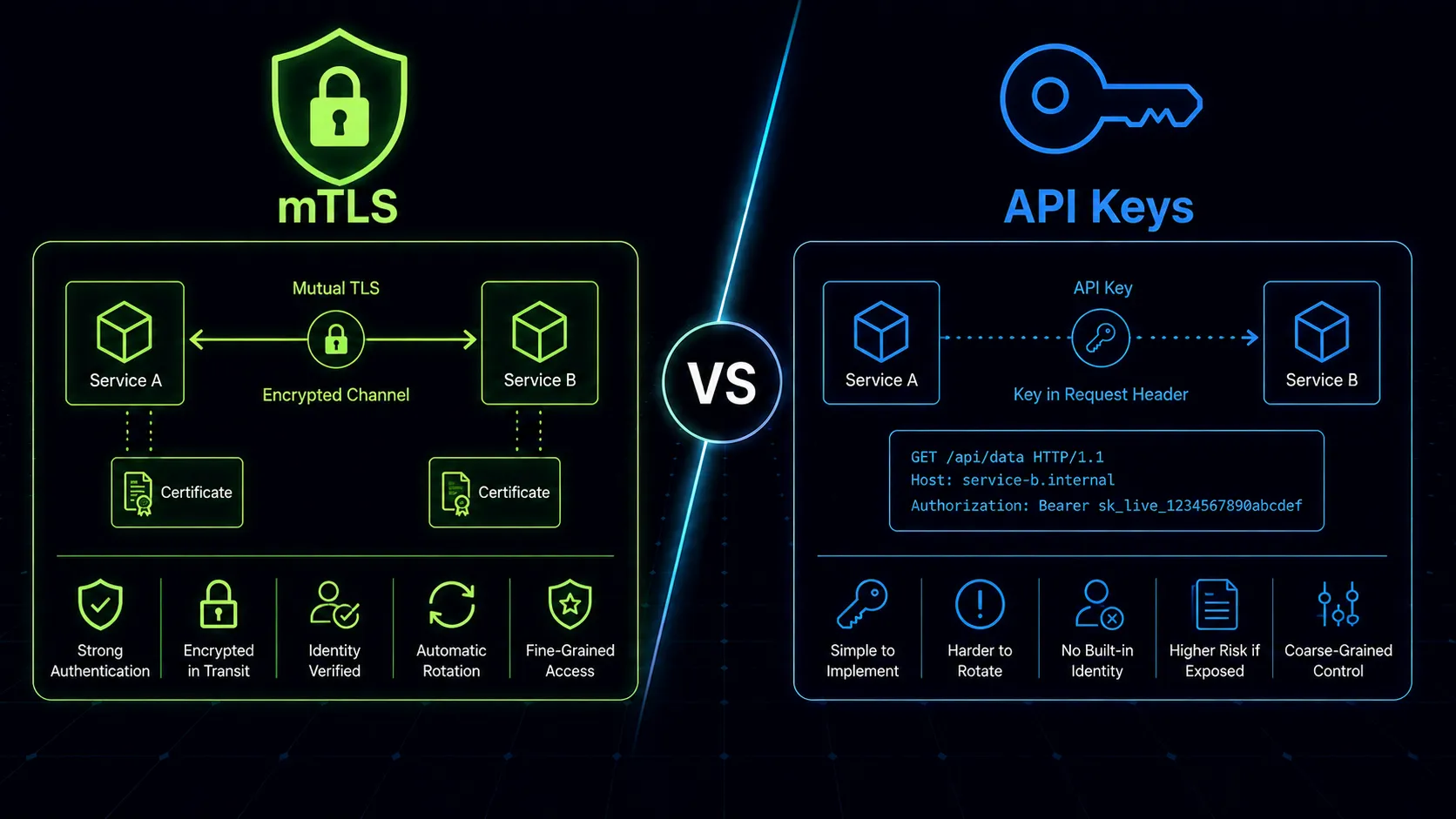
When you have two services and the first ten API calls pass an X-API-Key header, nobody questions the approach. When you have forty services passing API keys to each other across three environments, someone will inevitably commit a key to a git repo, a logging middleware will capture a header it shouldn’t, and you’ll spend a Friday night rotating credentials across production.
Service-to-service authentication is a different problem than user-to-service authentication. Users have browsers, login pages, and password managers. Services have code, configuration files, and automated deployments. The authentication mechanism you choose shapes how your infrastructure scales, how you handle incidents, and how much operational overhead your team absorbs.
The Problem Gets Harder as You Grow
Two services talking to each other is simple. Service A needs to call Service B, so you generate a key, store it in an environment variable, and move on. This works fine at small scale.
But microservices architectures don’t stay small. Services multiply. Each one needs to authenticate with several others. The number of credential pairs grows combinatorially. Suddenly you’re managing dozens of keys, each needing rotation schedules, access controls, and distribution mechanisms. One leaked key can grant lateral access if you haven’t scoped permissions tightly.
The question isn’t whether API keys or mTLS is “better” in the abstract. It’s which model fits the trust boundaries, operational maturity, and scale of your system.
API Keys for Service Authentication
API keys in the service-to-service context work exactly like you’d expect. The calling service includes a pre-shared secret in the request, typically as a header:
POST /api/orders HTTP/1.1
Host: inventory-service.internal
X-API-Key: sk_live_a1b2c3d4e5f6...
Content-Type: application/json
The receiving service validates the key against its store (database, config, secrets manager) and processes the request if it matches.
What API keys do well
Simplicity is the primary advantage. Every developer understands API keys. Every HTTP client supports them. Every language has the tooling. You can implement API key authentication in an afternoon and have it working across services by end of day.
Rotation is straightforward. Generate a new key, deploy it to the calling service, add it to the receiving service’s allowlist, remove the old key. You can support overlapping validity windows to avoid downtime during rotation.
Authorization metadata can ride along. Keys can map to specific scopes and permissions. Your inventory service can issue different keys to the order service (read/write) and the reporting service (read-only). This is harder to achieve with certificate-based identity alone.
External partner integrations default to API keys. When a third-party service needs to call your webhook or API, you’re issuing them an API key. That’s the universal pattern for external access.
Where API keys fall short
Keys are secrets in transit. Even over TLS, the key appears in the HTTP layer. It exists in request headers, which means it can show up in access logs, proxy logs, application logs, and error reporting tools. Any component in the request path that logs headers can capture the key.
There’s no identity verification of the caller. An API key proves the caller possesses a secret. It doesn’t prove the caller is a specific service. If your order service’s key leaks, anyone with that key can impersonate the order service. The receiving side cannot distinguish between the legitimate service and an attacker holding the same secret.
Credential management doesn’t scale linearly. With 50 services, you might need hundreds of keys. Each key needs secure storage, rotation, monitoring, and revocation capability. Secrets managers like HashiCorp Vault or AWS Secrets Manager help, but they add infrastructure and operational overhead.
Keys are prone to leaking. They end up in Dockerfiles, CI/CD logs, Slack messages, config files checked into repos, and stack traces. GitHub’s secret scanning catches some of this, but not all. The blast radius of a leaked key depends entirely on how narrowly you scoped it.
mTLS: Mutual TLS Authentication
Standard TLS is one-sided. The client verifies the server’s certificate (“am I talking to the real inventory-service?”), but the server doesn’t verify the client. mTLS adds the reverse: the server also demands a certificate from the client and validates it against a trusted certificate authority.
Both sides present X.509 certificates. Both sides verify the other’s identity. Authentication happens at the transport layer, before any application code runs.
How mTLS works in practice
- Service A opens a TLS connection to Service B
- Service B presents its certificate; Service A validates it against the trusted CA
- Service B requests Service A’s certificate
- Service A presents its certificate; Service B validates it against the trusted CA
- Both sides are cryptographically verified; the TLS handshake completes
- Application data flows over the encrypted, mutually authenticated connection
The certificates contain identity information (typically the service name in the Subject Alternative Name field), so Service B knows exactly which service connected, not just that someone had a valid key.
What mTLS does well
Cryptographic identity, not shared secrets. The private key never leaves the service that holds it. Authentication happens through a challenge-response mechanism during the TLS handshake. There’s no secret being transmitted in the request that could be logged or intercepted.
Certificates can’t be accidentally leaked the way API keys can. You won’t find a certificate’s private key in an HTTP access log. It doesn’t show up in error messages or request dumps. The authentication material never appears in the application layer.
Identity is verifiable. When Service B receives a connection from a client presenting a certificate with CN=order-service, it can cryptographically verify that claim. The certificate was signed by a trusted CA. This is fundamentally stronger than “this request has a string that matches a string in my database.”
mTLS fits naturally into zero-trust architectures. If your security model requires verifying every connection regardless of network location, mTLS provides that verification at the transport layer without any application changes.
Where mTLS gets complicated
Certificate lifecycle management is real work. You need a certificate authority (internal CA or managed service). You need to issue certificates to every service. You need to rotate certificates before they expire. You need to handle revocation when a service is decommissioned or compromised. This is PKI, and PKI is not simple.
Debugging is harder. When an API key doesn’t work, you check if the key matches. When mTLS fails, you’re digging into certificate chains, expiration dates, CA trust stores, certificate revocation lists, and TLS handshake logs. The failure modes are more varied and less obvious.
Initial setup cost is significant. Standing up an internal PKI, integrating certificate issuance into your deployment pipeline, configuring every service to present and validate certificates – this is days or weeks of work, not hours. Tools like cert-manager (Kubernetes), Vault PKI, or SPIFFE/SPIRE reduce the burden but don’t eliminate it.
Fine-grained authorization requires additional layers. mTLS tells you who the caller is. It doesn’t tell you what the caller is allowed to do. You still need an authorization layer on top, whether that’s an OPA policy, service-level RBAC, or network policies.
The Service Mesh Changes the Equation
Istio, Linkerd, and similar service meshes handle mTLS transparently. The sidecar proxy manages certificate issuance, rotation, and the mTLS handshake. Your application code doesn’t change at all. From your service’s perspective, it receives a plain HTTP request with identity headers injected by the proxy.
This is significant because it removes the primary objection to mTLS: operational complexity. The mesh handles PKI, certificate lifecycle, and the TLS configuration. You define policies (“order-service can call inventory-service”) and the mesh enforces them.
Linkerd takes the opinionated route – mTLS is on by default with no configuration required. Istio gives you more control with PeerAuthentication policies that let you enforce strict mTLS, permissive mode (accept both plaintext and mTLS), or disable it per namespace. Consul Connect uses its own CA and issues SPIFFE-compatible identities automatically.
The practical impact is substantial. Teams that spent weeks setting up internal PKI and certificate rotation pipelines can achieve the same outcome by deploying a service mesh and writing a few YAML policies. The mesh also gives you authorization policies on top of mTLS identity, closing the “authentication without authorization” gap.
If you’re already running a service mesh or planning to adopt one, mTLS comes essentially for free. If you’re not, deploying a service mesh solely for mTLS is almost certainly overkill – the mesh brings its own complexity in debugging, resource overhead, and operational knowledge.
The Middle Ground: OAuth 2.0 Client Credentials and JWTs
Between “simple shared secret” and “full PKI infrastructure” sits the OAuth 2.0 client credentials grant. A service authenticates to an authorization server with its client ID and secret, receives a short-lived JWT, and uses that JWT to call other services.
This gives you several advantages over plain API keys:
- Short-lived tokens reduce the window of exposure if a token leaks
- The authorization server centralizes credential validation and can enforce policies
- JWTs carry claims (scopes, service identity, metadata) that receiving services can validate without a database lookup
- Token issuance is auditable at the authorization server
The trade-off is added infrastructure (you need an authorization server) and added latency (token acquisition adds a round trip, though caching mitigates this). But for teams that already run Keycloak, Auth0, or a similar identity provider, this is a natural extension.
Worth noting: OAuth 2.0 client credentials and mTLS aren’t mutually exclusive. Some architectures use mTLS for transport-layer authentication and JWTs for application-layer authorization. The mTLS handshake verifies the service identity, while the JWT carries fine-grained permissions and scopes. This layered approach is common in financial services and healthcare platforms where both strong identity and granular authorization are regulatory requirements.
When to Use API Keys
API keys remain the right choice in several scenarios:
- Early-stage architectures where you have fewer than ten services and operational simplicity matters more than defense-in-depth
- External partner integrations where you can’t require clients to implement mTLS or OAuth flows
- Low-security internal services where the data isn’t sensitive and the blast radius of a compromised key is small
- Third-party webhooks and callbacks where the calling service dictates the authentication pattern
- Prototyping and development environments where PKI overhead would slow iteration
If you use API keys at scale, invest in a secrets manager, enforce rotation policies, and never pass keys as query parameters. Treat them as credentials that will leak eventually and design your rotation and monitoring accordingly.
When to Use mTLS
mTLS is the stronger choice when:
- You’re operating in a zero-trust environment where network location doesn’t imply trust
- You’re running a service mesh that handles mTLS automatically (Istio, Linkerd, Consul Connect)
- Compliance requirements mandate strong mutual authentication (PCI-DSS, SOC 2, FedRAMP)
- You have high-security internal services processing financial data, PII, or health records
- You need defense against lateral movement – a compromised service can’t impersonate another without its private key
- Your team has the operational maturity to manage PKI or a tool like SPIFFE/SPIRE
mTLS is not “API keys but harder.” It’s a fundamentally different trust model. API keys prove possession of a secret. mTLS proves cryptographic identity. That distinction matters when the threat model includes compromised services, insider threats, or sophisticated attackers who can intercept internal traffic.
The Bottom Line
Most teams should start with API keys and migrate to mTLS as their architecture and security requirements mature. There’s no shame in API keys for a system with five services and a small team. There’s real risk in API keys for a system with fifty services handling payment data in a regulated industry.
If you’re running Kubernetes with a service mesh, turn on mTLS. The operational cost is negligible and the security improvement is substantial. If you’re not running a service mesh and you’re not ready to operate PKI, use API keys with a secrets manager and strict rotation policies – but plan the migration path.
The teams that get into trouble are the ones running API keys at a scale and sensitivity level that demands mTLS, and the ones running mTLS without the operational maturity to manage it. Match the mechanism to your reality, not your aspirations.