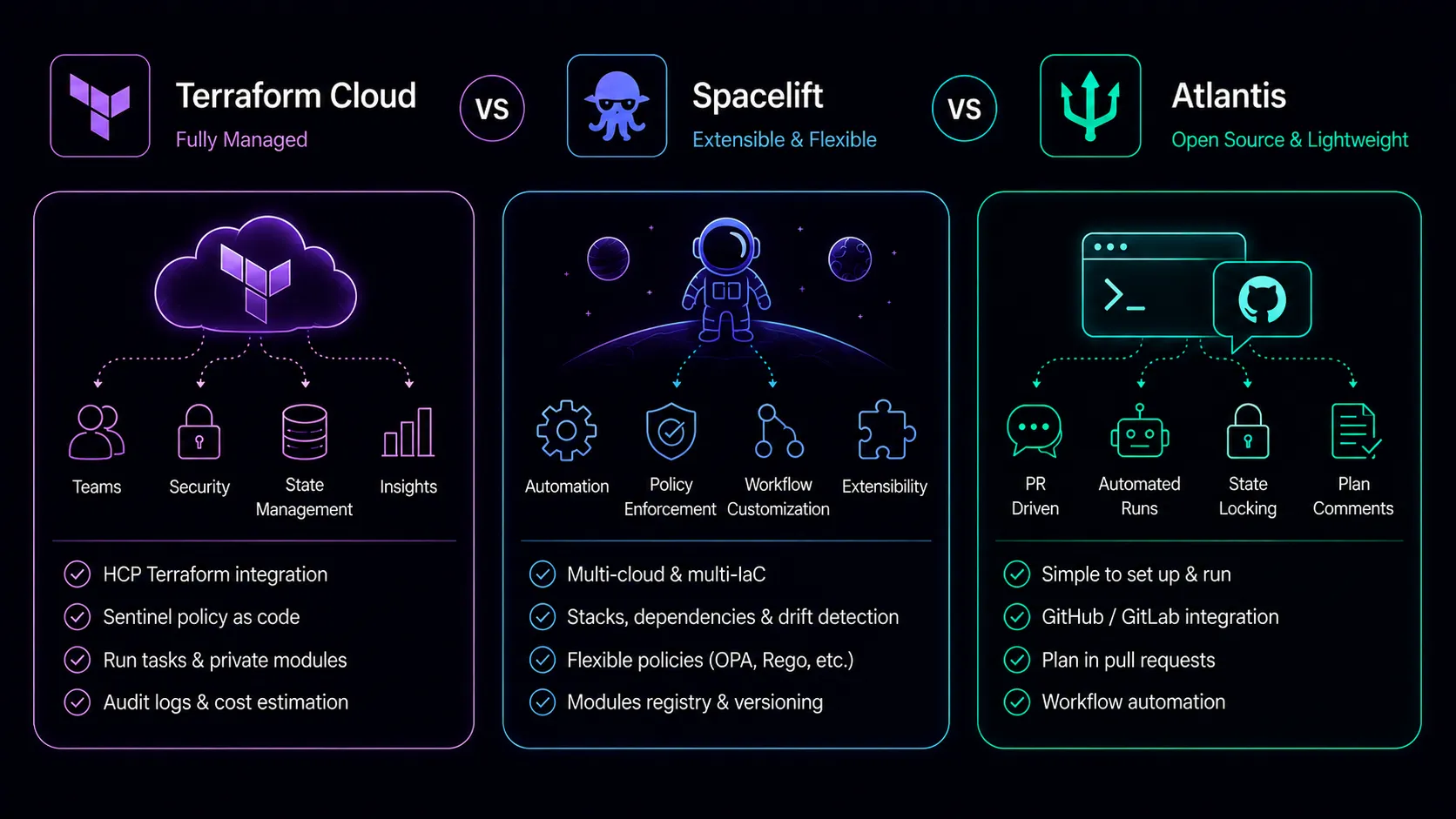
Running Terraform from someone’s laptop works until it doesn’t. The first time two engineers run terraform apply against the same state file simultaneously, or a junior developer provisions an unrestricted S3 bucket in production because nobody reviewed the plan, you realize the tool itself isn’t enough. You need a workflow around it.
Terraform Cloud, Spacelift, and Atlantis all solve this problem, but they make fundamentally different bets about where that workflow should live and how much control you want.
The Problem These Tools Solve
Terraform alone handles infrastructure provisioning. What it doesn’t handle is the collaboration layer: who can run what, when, and with what guardrails. Teams need remote state with locking so concurrent runs don’t corrupt state files. They need a review process so infrastructure changes get the same scrutiny as application code. They need policy enforcement so guardrails exist even when someone is moving fast under pressure. And they need audit trails so you can answer “who changed what and when” six months after the fact.
You can cobble this together with CI/CD pipelines, S3 backends, and DynamoDB lock tables. Many teams do. But at a certain scale, maintaining that glue code becomes its own operational burden, and the three platforms in this comparison exist to take that burden off your plate.
Terraform Cloud (HCP Terraform)
Terraform Cloud is HashiCorp’s answer to the collaboration problem. It’s now officially branded as HCP Terraform, though most people still call it Terraform Cloud or TFC. Being built by the same company that builds Terraform gives it an integration advantage that’s hard to replicate.
What You Get
Remote state management is handled automatically. State is stored, versioned, encrypted, and locked during operations. VCS integration connects to GitHub, GitLab, Bitbucket, or Azure DevOps, triggering plan runs when pull requests are opened and apply runs when they’re merged. The private module registry lets you publish and version internal modules the same way you’d use the public Terraform Registry. Variable sets let you share credentials and configuration across workspaces without duplication.
The run experience is solid. Open a PR, TFC runs a plan, posts the output as a comment, and waits for approval before applying. Speculative plans run on every commit so reviewers see what the change will actually do, not just what the code looks like.
Sentinel Policies
TFC’s policy engine is Sentinel, HashiCorp’s proprietary policy-as-code language. It’s purpose-built for evaluating Terraform plans, and it’s deeply integrated into the run pipeline. Policies can inspect the planned changes, check resource attributes, enforce naming conventions, require specific tags, limit instance sizes, or block entire resource types. Sentinel operates at different enforcement levels: advisory (warn but allow), soft-mandatory (allow override with justification), and hard-mandatory (no exceptions).
The downside is that Sentinel is proprietary to HashiCorp. Your policy knowledge doesn’t transfer to other tools, and the language has a smaller community than general-purpose alternatives. If you leave TFC, your Sentinel policies stay behind.
Pricing
TFC offers a free tier for small teams (up to five users with limited features). The Standard tier runs $0.00014 per resource managed per hour, which translates to roughly $1.03 per resource per month. The Plus tier adds features like drift detection, continuous validation, and audit logging. For organizations managing thousands of resources, costs can climb quickly. The per-resource pricing model means your bill scales with your infrastructure footprint, not just your team size.
Spacelift
Spacelift entered the market as a more flexible alternative to TFC, and it’s been gaining traction steadily. The pitch is broader tool support, more powerful policy enforcement, and features that TFC either doesn’t offer or locks behind expensive tiers.
What You Get
Spacelift supports Terraform, OpenTofu, Pulumi, CloudFormation, Ansible, and Kubernetes. If your organization uses multiple IaC tools, managing them from a single platform has obvious operational benefits. You don’t need separate workflow tools for your Terraform and Pulumi stacks.
Stacks are Spacelift’s core concept, roughly equivalent to TFC workspaces. But Spacelift adds layers of functionality on top: blueprints for templating new stacks, stack dependencies for orchestrating multi-stack deployments, and drift detection that runs on a schedule and alerts you when actual infrastructure diverges from the declared state. Contexts let you share environment variables and mounted files across stacks, similar to TFC’s variable sets but with more flexibility in how they’re attached and prioritized.
OPA Policies
Spacelift uses Open Policy Agent (OPA) with Rego for policy enforcement. OPA is an open standard used across the cloud-native ecosystem, from Kubernetes admission control to API authorization. Policies you write for Spacelift transfer conceptually (and sometimes literally) to other systems. The Rego language has a larger community, more learning resources, and broader applicability than Sentinel.
Spacelift’s policy system is also more granular than TFC’s. Policies can control not just what Terraform can do, but who can trigger runs, which branches can be deployed, how approvals work, and how resources are auto-attached to stacks. Plan policies, push policies, approval policies, and trigger policies each operate at different points in the workflow.
Drift Detection and Reconciliation
Spacelift runs scheduled plans to detect when infrastructure has drifted from the declared state. When drift is detected, you can configure automatic reconciliation or require manual review. TFC added drift detection in its Plus tier, but Spacelift has offered it longer and made it a more central part of the workflow. For teams where manual console changes are a persistent problem, this feature alone can justify the platform.
Pricing
Spacelift charges per worker (the compute that runs your Terraform operations). The Cloud tier starts at $40 per worker per month. You can scale workers up and down based on how many concurrent runs you need. This model decouples cost from infrastructure size, which benefits teams managing large environments. A team with 10,000 resources running sequential applies pays the same as a team with 100 resources if they use the same number of workers.
Atlantis
Atlantis takes a completely different approach. It’s open source, self-hosted, and opinionated about one thing: Terraform workflows belong in pull requests.
What You Get
Atlantis runs as a service in your infrastructure (typically a container in Kubernetes, ECS, or a VM). It watches for pull request events via webhooks, runs terraform plan when PRs are opened or updated, posts the plan output as a PR comment, and runs terraform apply when someone comments atlantis apply. The entire workflow lives in the pull request. There’s no separate UI, no dashboard, no additional login.
This simplicity is Atlantis’s greatest strength. The plan output is right there in the PR where reviewers are already looking. There’s no context switch to a separate platform. Every team member with repository access can see exactly what Terraform will do, using the same review process they already use for application code.
Configuration
Atlantis configuration lives in an atlantis.yaml file in your repository root. You define which directories contain Terraform projects, what workspace to use, whether to enable auto-planning and auto-applying, and any custom workflow steps. Server-side configuration controls global settings like which repositories Atlantis will serve, default behaviors, and webhook secrets.
Custom workflows let you add steps before or after plan and apply. Need to run tflint before every plan? Add it as a pre-plan step. Need to send a Slack notification after every apply? Add a post-apply step. The workflow system is flexible enough for most needs, though it requires shell scripting rather than a structured policy language.
The Self-Hosting Trade-off
Atlantis doesn’t manage state. You still need a remote backend (S3 + DynamoDB, GCS, Azure Blob Storage) configured in your Terraform code. Atlantis doesn’t provide a private registry, drift detection, or cost estimation. You manage the Atlantis server itself: updates, scaling, monitoring, credentials rotation, and security.
This is the honest trade-off. Atlantis is free, transparent, and free of vendor lock-in. But you’re responsible for everything the managed platforms handle for you. For a small team running a single Atlantis instance, this is manageable. For a large organization needing high availability, multiple Atlantis instances across regions, and fine-grained access control, the operational burden grows.
Workflow Comparison
The plan/apply/review cycle is where these tools diverge most visibly, and it’s the part your engineers interact with daily.
Terraform Cloud: PR triggers speculative plan. Plan output appears in TFC UI and optionally as a PR status check. Reviewers check the plan in TFC’s interface. On merge (or manual confirmation), TFC runs apply. Everything funnels through TFC’s UI and API. The experience is polished but requires context-switching between your VCS and the TFC dashboard. Cost estimation is built into the run output, which helps reviewers understand the financial impact of changes before they land.
Spacelift: Similar to TFC but with more granular controls. PRs trigger proposed runs. Plan output appears in Spacelift’s UI. Approval policies can require specific reviewers or conditions. Stack dependencies can trigger downstream plans automatically, so changing a shared networking module can cascade plans to every stack that depends on it. The workflow is more configurable but also more complex to set up initially.
Atlantis: PR triggers plan. Plan output is posted directly as a PR comment. Reviewers read the plan in the same place they review code. Someone comments atlantis apply to proceed. No external UI required. The entire audit trail is the PR history. This is the most developer-friendly workflow for teams already accustomed to code review processes, but it lacks the richer visualization that TFC and Spacelift provide for complex changes spanning dozens of resources.
State Management
TFC manages state as a core feature. State is stored in TFC’s infrastructure, encrypted, versioned with every run, and accessible via the API. You never touch a state file directly unless you’re importing or doing manual surgery.
Spacelift also manages state, though you can bring your own backend if you prefer. Managed state gets the same encryption and versioning treatment. The flexibility to choose is useful for organizations with strict data residency requirements.
Atlantis delegates state entirely to whatever backend you configure in your Terraform code. It doesn’t store, manage, or interact with state beyond what terraform plan and terraform apply do normally. This means state management is your problem, but it also means there’s no state lock-in to the platform.
Policy Enforcement
TFC uses Sentinel. Purpose-built for Terraform, tightly integrated, proprietary. Effective but creates lock-in. Writing a Sentinel policy to block public S3 buckets or enforce tagging standards takes a few lines and works reliably. The limitation isn’t capability; it’s portability.
Spacelift uses OPA/Rego. Open standard, broader ecosystem, transferable skills. More policy types covering more of the workflow. The same Rego knowledge you build writing Spacelift policies applies to Kubernetes admission control, CI/CD pipelines, and API gateways. That cross-domain utility matters when you’re investing in a policy language your team will use for years.
Atlantis has no built-in policy engine. You can add conftest (which uses OPA) as a custom workflow step, integrate with external policy tools via webhooks, or rely on PR review processes. This works, but it requires assembly. Out of the box, the only guardrail is human review.
For organizations where policy enforcement is a regulatory requirement, Spacelift’s approach offers the best combination of power and portability. TFC’s Sentinel is equally capable but ties you to the HashiCorp ecosystem. Atlantis requires the most work to reach the same level of automated policy enforcement.
Security Considerations
All three tools need cloud credentials to provision infrastructure, and how they handle those credentials differs. TFC and Spacelift support OIDC federation with AWS, GCP, and Azure, eliminating long-lived credentials entirely. Atlantis requires you to manage credential injection yourself, typically through IAM roles for the host instance or mounted secrets in Kubernetes. This isn’t a dealbreaker, but it’s another piece of operational plumbing you’re responsible for.
TFC and Spacelift also offer audit logging out of the box, tracking who triggered runs, who approved applies, and what changed. With Atlantis, your audit trail is your git history and whatever logging you’ve configured on the server. For compliance-conscious organizations, the managed platforms provide this with less effort.
The OpenTofu Factor
HashiCorp’s license change from MPL to BSL in 2023 created OpenTofu, a community-maintained fork under the Linux Foundation. This matters for platform selection because TFC does not support OpenTofu and almost certainly never will. Spacelift supports OpenTofu as a first-class runtime alongside Terraform. Atlantis supports OpenTofu through configuration since it just executes whatever binary you point it at.
If your organization has moved to OpenTofu or is considering it, TFC is off the table. Spacelift and Atlantis both accommodate the switch without significant workflow changes. This isn’t a hypothetical concern. The BSL license restricts competitive use, and legal teams at larger organizations have flagged it as a risk worth mitigating. Having a platform that supports both Terraform and OpenTofu gives you optionality without forcing an immediate decision.
Cost Comparison
Running the math for a mid-size team (10 engineers, 2,000 managed resources, moderate run frequency):
Terraform Cloud (Standard): Roughly $2,000/month for resource management plus per-user fees. The Plus tier with drift detection and audit logging pushes this higher. Costs scale linearly with resource count.
Spacelift (Cloud): Two to four workers at $40/month each, plus any add-ons. Roughly $80-$160/month for the same workload. Costs scale with concurrency needs, not infrastructure size.
Atlantis: The software is free. Infrastructure costs depend on how you host it. A small EC2 instance or Kubernetes pod costs $20-$50/month. Add your time managing it: updates, monitoring, troubleshooting. The total cost of ownership is lower for small teams but can approach managed platform costs at scale when you factor in engineering time.
The pricing gap between Spacelift and TFC is significant for teams with large infrastructure footprints. TFC’s per-resource model penalizes exactly the teams that most need a collaboration platform.
When to Choose Each
Choose Terraform Cloud When
You want the tightest possible integration with Terraform itself. HashiCorp builds both, and that shows in features like the private registry, run tasks, and continuous validation. If your organization is already invested in the HashiCorp ecosystem (Vault, Consul, Nomad), TFC fits naturally. The free tier is a reasonable starting point for small teams evaluating the approach. TFC also makes sense for organizations that value vendor support contracts and need someone to call when things go wrong at 3 AM.
Choose Spacelift When
You need flexibility. Multiple IaC tools, OPA-based policies, drift detection without premium pricing, or OpenTofu support all point toward Spacelift. The pricing model is friendlier for large infrastructure footprints, and the policy system is more powerful and portable. If you’re building a platform engineering function that serves multiple teams with different tool preferences, Spacelift’s breadth is a genuine advantage. Teams that have outgrown TFC’s pricing or hit the ceiling of what Sentinel can express tend to land here.
Choose Atlantis When
You want simplicity, transparency, and zero vendor lock-in. Your team is comfortable managing infrastructure, you already have a remote state backend, and you want Terraform plans visible in the same place you review code. Atlantis works especially well for teams that are disciplined about PR reviews and don’t need automated policy enforcement beyond what conftest or similar tools provide. It’s also the right choice when budget constraints are real and engineering time is more available than subscription dollars.
Atlantis is particularly popular with consultancies and agencies that manage infrastructure across many client accounts. The lightweight deployment model means you can spin up project-specific instances without committing to another SaaS subscription per client.
The Bottom Line
TFC is the safe choice that works well until pricing becomes a pain point. Spacelift is the most capable platform with the best cost structure for growing teams. Atlantis is the most transparent option that trades operational simplicity for self-management responsibility.
If we had to pick one recommendation: start with Atlantis if your team is small and operationally capable. Move to Spacelift when you need policy enforcement, drift detection, or multi-tool support. Choose TFC when HashiCorp ecosystem integration is a genuine priority, not just familiarity.
Don’t overthink the migration path either. Moving between these tools is less painful than you might expect. Your Terraform code stays the same regardless of which platform runs it. State can be migrated between backends. The investment you’re making is in workflow and process, not in code that locks you in permanently.
The worst option is running Terraform without any collaboration layer at all. All three of these tools are better than terraform apply on a laptop. Pick the one that matches your team’s size, skills, and willingness to manage infrastructure for your infrastructure.