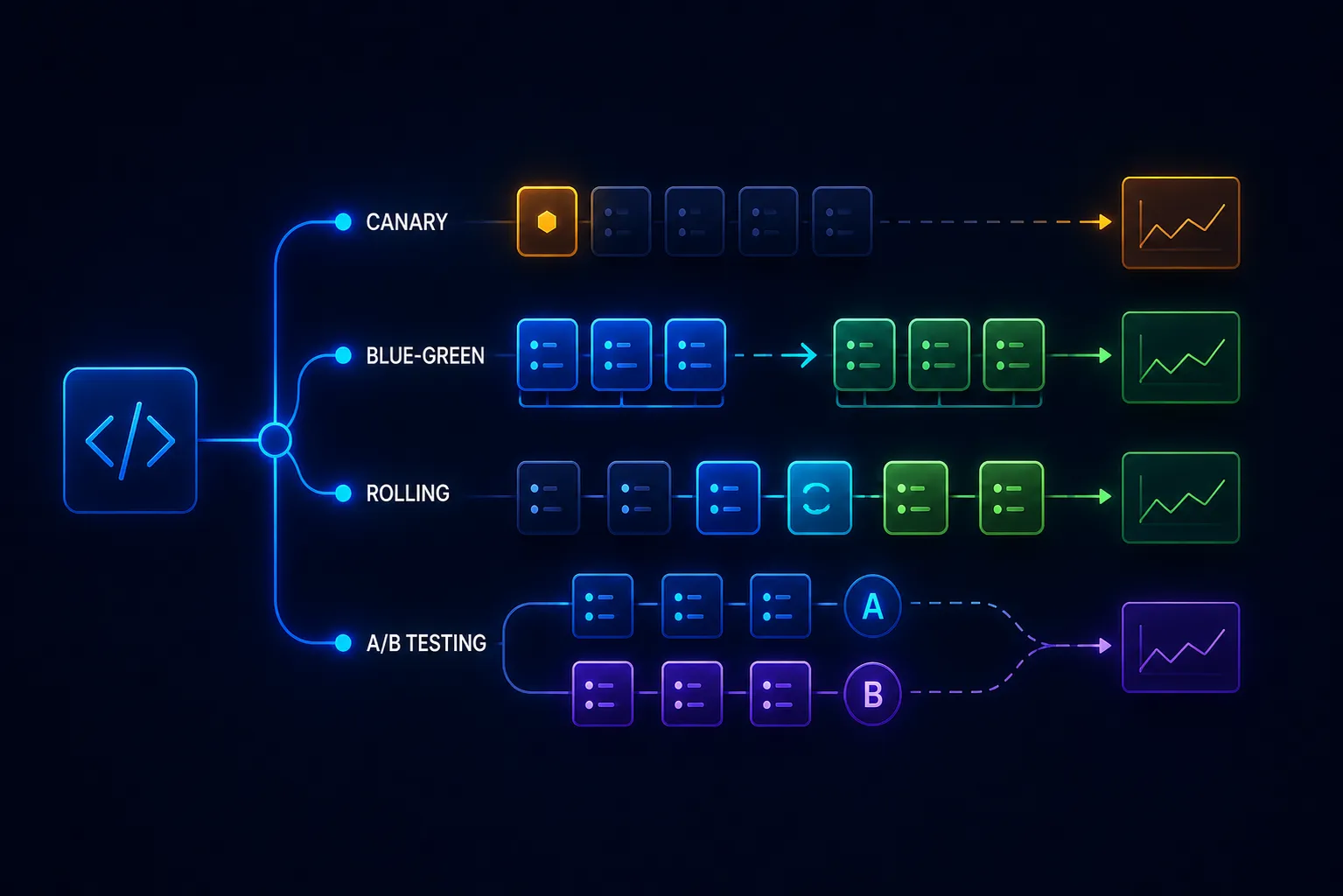
Deployment strategy is one of those decisions that gets made once and then lives in your platform for years. Teams inherit rolling deployments from Kubernetes defaults, or blue-green from their first serious platform, and rarely revisit whether it’s still the right fit for their risk profile.
Each strategy makes different trade-offs between deployment speed, rollback capability, infrastructure cost, and the blast radius of a bad release. Understanding those trade-offs is how you pick the right approach—or more commonly, the right combination of approaches for different services.
Rolling Deployment
Rolling deployment is Kubernetes’s default. Pods running the old version are replaced gradually with pods running the new version. Kubernetes controls the rate via maxSurge (extra pods allowed during rollout) and maxUnavailable (pods allowed to be down during rollout).
strategy:
  type: RollingUpdate
  rollingUpdate:
    maxSurge: 1
    maxUnavailable: 0
With maxUnavailable: 0, Kubernetes brings up new pods before terminating old ones—no capacity reduction during rollout. With maxSurge: 1, at most one extra pod runs at a time.
How it works in practice: During a rolling deployment, some requests hit old pods and some hit new pods simultaneously. This is the critical implication: both versions of your code must handle the same traffic simultaneously during the rollout window. If your new version introduces a breaking change to a database schema, API contract, or message format—one that the old version can’t process—you have a problem during the overlap.
Rollback: Kubernetes rolling rollback (kubectl rollout undo) replaces new pods with old pods using the same rolling process. Rollback is not instant—it takes as long as the original rollout.
When to use rolling:
- Your service is stateless and both versions can coexist
- Deployments are low-risk and rollback speed isn’t critical
- You want the simplest operational model with no extra infrastructure
Rolling deployment limitations:
- Version coexistence during rollout: both versions run simultaneously
- Rollback is slow and non-atomic
- No mechanism to test the new version on real traffic before full rollout
Blue-Green Deployment
Blue-green maintains two identical production environments: blue (current) and green (new). Traffic routes to blue while green is staged and tested. When you’re ready to release, you flip the traffic—instantly, at the load balancer level—to green. Blue becomes the standby.
The key property: the traffic switch is atomic and instant. At the moment of cutover, 100% of traffic moves to the new version. No period where both versions serve live traffic simultaneously. See rollback strategies at 3am for how blue-green fits into a production incident response plan.
Rollback: Flip traffic back to blue. This is also instant, and blue has been running the known-good version throughout. You get the fastest, cleanest rollback possible.
Database considerations: Blue-green is straightforward for stateless services. For services with databases, the cutover must consider schema compatibility. If green requires a schema change that blue doesn’t understand, you need to apply the schema change before cutover in a backward-compatible way (expand/contract migration pattern), or accept that rollback after a schema-changing deployment is more complex.
Infrastructure cost: You’re running two production environments simultaneously. For large services, this doubles compute cost during the deployment window. Some teams keep the standby environment scaled down to minimal capacity and scale it up for deployments.
When to use blue-green:
- Rollback speed is critical—you need instant recovery from a bad release
- You have stateless services where dual-environment cost is acceptable
- You need a clean separation of old and new traffic (zero overlap period)
- You’re doing database migrations that need atomic cutover
Canary Deployment
Canary deployment routes a small percentage of production traffic to the new version while the majority continues on the old. The canary group expands progressively—5% → 20% → 50% → 100%—with validation gates between stages.
The name comes from coal mining: canaries detected gas before humans did. A canary deployment detects production problems at small scale before they affect all users.
The key property: real production traffic validates the new version with limited blast radius. If the canary has a bug that causes 3% error rate, 5% of users are affected before the problem is caught—not 100%.
What to validate between stages:
- Error rate: is the canary’s error rate significantly higher than the baseline?
- Latency: has p99 latency increased?
- Business metrics: for critical paths (checkout, signup), are conversion rates normal?
- Log signals: are new error patterns appearing?
Automated vs. manual progression: Manual progression (a human approves each stage) is safe but slow. Automated progression (a system evaluates metrics and advances or rolls back automatically) is faster and removes the human bottleneck—but requires reliable SLO data and tuned thresholds.
Implementation complexity: Canary requires traffic splitting at the routing layer. Options:
- Ingress-based splitting (Nginx, Kong, AWS ALB weighted target groups)
- Service mesh-based splitting (Istio, Linkerd VirtualService weight)
- Kubernetes native with Argo Rollouts or Flagger (both implement canary + progressive delivery natively)
When to use canary:
- High-traffic services where a bug could impact many users before detection
- Changes where you need real production signal before committing to full rollout
- Compliance or enterprise environments where release validation is required
- Services where you have reliable SLO data to automate promotion gates
Feature Flags: Deployment Without Release
Feature flags decouple deployment from release. You deploy code to production but control its activation through configuration. The new feature is live in the binary but switched off until you’re ready—then enabled for specific users, percentages, or segments.
This is different from deployment strategies: the code is always the latest version on all servers. Feature flags control which users see which behavior, not which servers run which code.
What feature flags unlock:
- Dark launches: deploy and test against production data without user-visible effects
- Targeted rollout: enable a feature for beta users, internal users, or specific customer segments before general release
- Kill switches: disable a feature instantly if it causes problems, without a rollback deployment
- A/B testing: measure the impact of different implementations on real users
The operational cost: Feature flags require a management system (LaunchDarkly, Unleash, GrowthBook, Flagsmith, or home-built). Old flags accumulate and become technical debt. Every flag is a branch in production code that must be tested in multiple states. See feature flags done right for lifecycle management practices that prevent flag sprawl.
When to use feature flags (alongside deployment strategies):
- New features with business risk (you want to enable gradually)
- Infrastructure changes where you need a kill switch (new payment provider, new cache layer)
- A/B experiments where you need controlled traffic splits for statistical validity
- Regulatory requirements where features must be disabled in specific jurisdictions
Choosing the Right Strategy
Most mature teams use multiple strategies simultaneously:
- Rolling for low-risk, stateless services where deployment simplicity matters and rollback speed is acceptable
- Blue-green for databases, stateful services, or any service where an instant rollback capability is worth the infrastructure cost
- Canary for high-traffic, user-facing services where production validation before full rollout is required
- Feature flags for business logic changes that need decoupled release regardless of deployment strategy
The deployment strategy is a property of the service’s risk profile, not the organization. A payments service warrants canary with automated SLO gates. An internal admin panel is fine with rolling. A service with complex schema migrations benefits from blue-green’s atomic cutover.
The One Thing Most Teams Skip
Regardless of strategy: test your rollback. Most teams have rollback procedures they’ve never executed. The first time you execute an untested rollback is during an incident, under pressure, with users impacted.
Schedule a quarterly rollback drill: deploy to production, then rollback. Measure how long it takes and what breaks. Your rollback procedure is only as reliable as the last time you ran it.